LLM Council
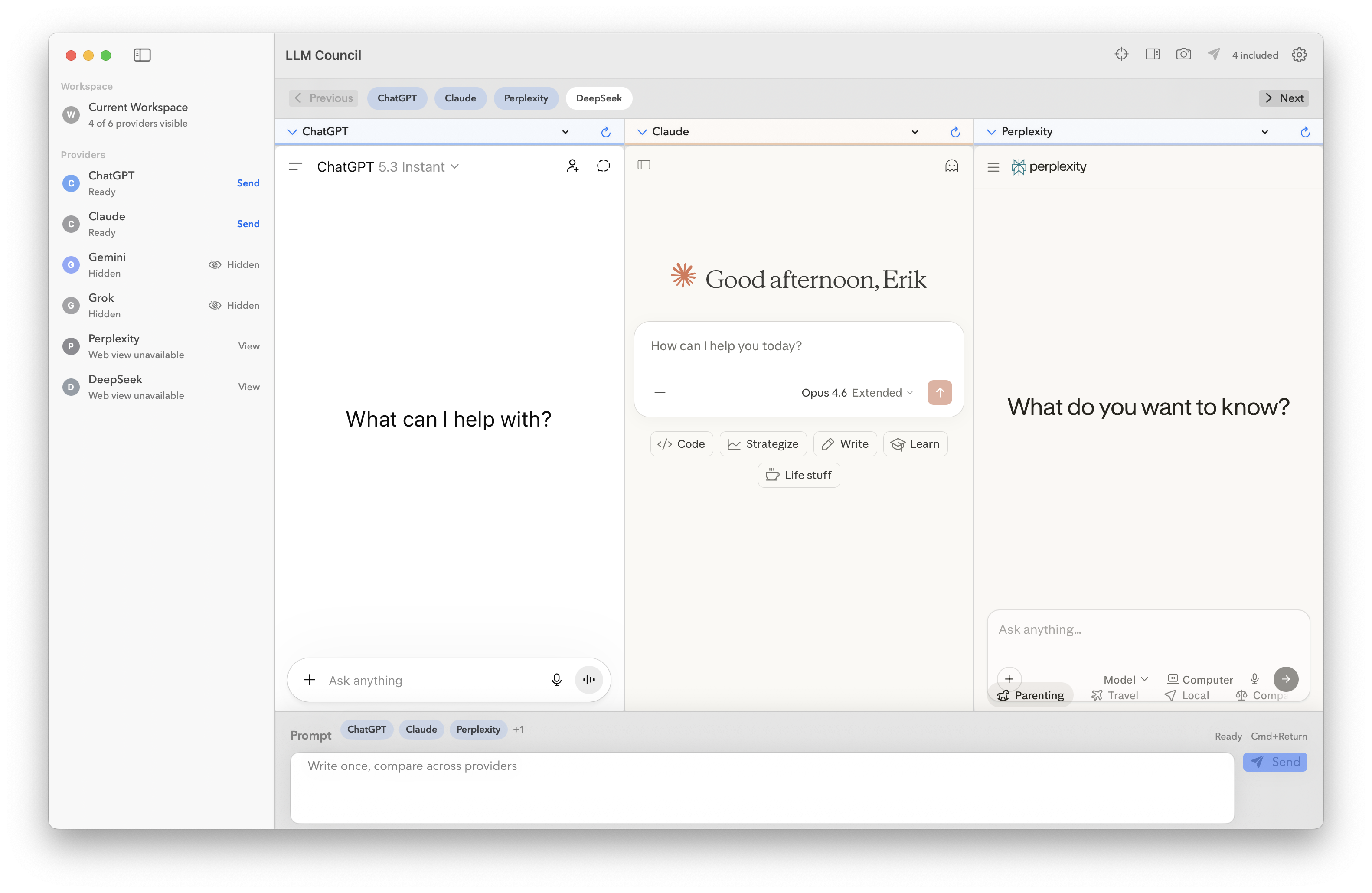
One prompt. Every model. No more tab chaos.#
If you work with LLMs daily — comparing outputs, stress-testing prompts, running the same question through Claude, ChatGPT, Gemini, and Grok — you know the drill. Copy prompt. Switch tab. Paste. Switch tab. Paste. Switch tab. Paste. Repeat until your brain melts.
LLM Council for MacOS kills that workflow dead.
It’s a native macOS app that puts every provider side-by-side in a single workspace, with a shared composer that dispatches your prompt to all visible models simultaneously. Write once, send everywhere, compare instantly.
What it does#
LLM Council loads each provider’s actual web UI in its own pane — not an API wrapper, not a janky iframe hack. Your existing logins, your existing conversations, your existing Pro/Plus/Premium subscriptions. The app just gives you a sane way to use them all at once.
Shared prompt dispatch — Type once in the composer, hit send, and your prompt fires to every active pane. No copying, no pasting, no context-switching.
Focus mode & compare mode — Zoom into one provider when you need depth, or spread them all out when you need breadth.
Layout presets — Two-up, three-up, grid. Pane paging for when you’re running more providers than screen real estate allows.
Session persistence — Your workspace state, prompt history, and saved sessions live locally on your machine. Pick up exactly where you left off.
Prompt presets & history — Save your go-to system prompts and recall previous dispatches without digging through browser history.
Supported providers#
- ChatGPT (OpenAI)
- Claude (Anthropic)
- Gemini (Google)
- Grok (xAI)
- Perplexity
- DeepSeek
Each provider runs in an isolated web data store. No cross-contamination, no shared cookies, no weird session conflicts.
Privacy-first by design#
LLM Council is local-first. Everything — workspace state, history, presets, saved sessions — stays on your machine in UserDefaults. There’s no cloud sync, no telemetry, no analytics phone-home. The app doesn’t touch any provider APIs and doesn’t ask for your API keys. You use your own accounts through each provider’s web interface, same as you always have.
Who it’s for#
You’re a power user who lives inside multiple LLMs. Maybe you’re:
- Prompt engineering and need to see how different models interpret the same instruction
- Evaluating models for a specific use case and want real side-by-side comparisons
- Building with AI and want to cross-reference outputs before committing to an approach
- Running a council — using consensus across models to improve output quality and reduce hallucination
If you’ve ever had 6 browser tabs open to 6 different chat UIs, this is your app.
Open source, MIT licensed#
LLM Council is fully open source. Inspect it, fork it, contribute to it.
Build from source:
./bin/bootstrap
./bin/build-macos
./bin/test-unit
./bin/smoke
Full build instructions in BUILDING.md.
Current status#
Early open-source release. The app works and I use it daily, but APIs and project structure may shift as things harden. Provider web UIs change their DOM structures periodically, so automation adapters may need updates — contributions welcome.
LLM Council is an independent project and is not affiliated with or endorsed by OpenAI, Anthropic, Google, xAI, Perplexity, or DeepSeek.